Seamless dining experiences. Run the floor, take orders, push tickets to the kitchen, and print bills — all from one POS system.
Finlo Dine connects floor staff, kitchen, and checkout so guests move smoothly and tickets never get lost.
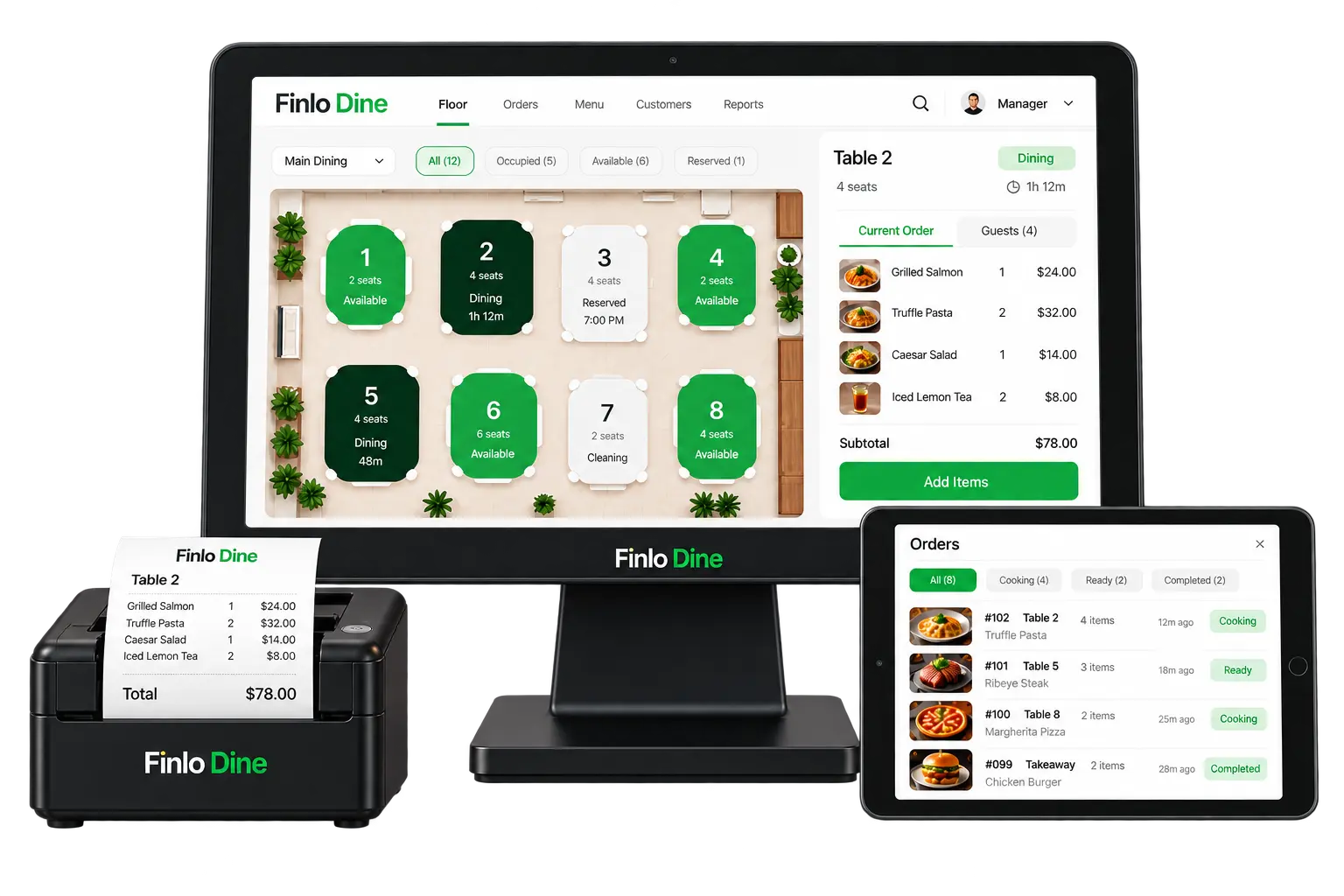
See Available, Occupied, Reserved, and Cleaning tables with seat counts and dining timers.
Open a table, add menu items, and keep a running subtotal in the order sidebar.
Handheld/tablet view filters Cooking, Ready, and Completed so the pass stays clear.
Print itemised bills straight to your thermal printer when guests are ready to pay.
Manage menu, returning guests, and reports from the same POS header.
Track sales and table turns so managers know how the service is performing.
One continuous path from seating to settlement.
Pick an Available table on the floor plan.
Add items from the menu to the table ticket.
Kitchen board shows Cooking with elapsed time.
Mark Ready — waitstaff pick up and deliver.
Print receipt, take payment, free the table.
Table status updates live: Dining → Cleaning → Available.
Filter All / Occupied / Available / Reserved. Open Table 2 to see seats, dining time, and the current order list with subtotal.
Orders arrive on the handheld with dish name, table, item count, and age. Staff move tickets through Cooking → Ready → Completed.
Confirm the ticket, print on the Finlo Dine thermal printer, collect payment, then reset the table for the next party.
Fast table turns with clear kitchen tickets.
Floor plan + reserved tables for service polish.
Quick orders and printed bills at the counter.
Coordinate multi-station kitchens in one board.
Kitchen sees the same order the POS captured.
Live status shows which tables are free or ready to bill.
Cooking / Ready / Completed keeps the pass organised.
Itemised receipts print the moment you settle.
We’ll map Finlo Dine to your covers, kitchen stations, and printers.